Export mass and plans to Rhino, SketchUp, and CAD
An option you have finished comparing continues in another tool. topoGenesis exports mass and plan drafts in Rhino, SketchUp, CAD, and IFC formats.
Real example: Daehak-ro, Yuseong-gu, Daejeon
- Site area
- 676㎡
- Floors
- 5 above grade
- One-line brief
- “Lobby and café on the ground floor, co-working offices and meeting rooms on floors 2 to 5”
- Spaces it made
- Lobby 122 py · café 160 py · co-working 493 py · meeting rooms 211 py · plant room 13.3 py
- Three generated options
- Option 1 L/T corner · GFA 3,422 m² · score 59
- Option 2 inner lobby · GFA 3,390 m² · score 59
- Option 3 ABM growth · GFA 3,360 m² · score 59
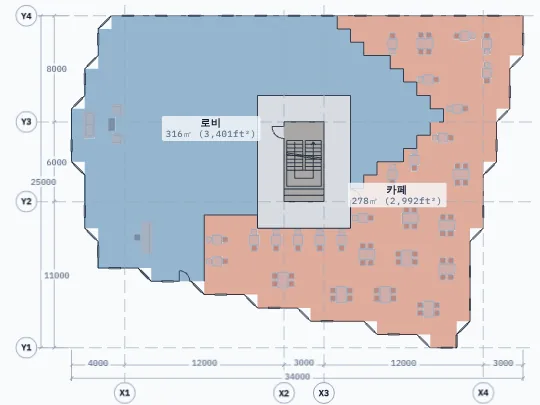

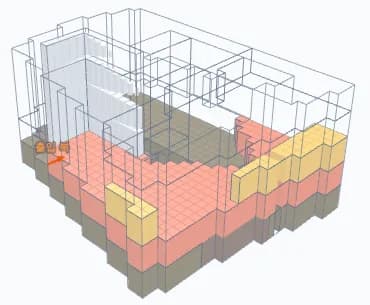
When generation finished an “export drawings” row appeared at the top with SKP, DWG, IFC, and 3DM buttons. The option picked on the cards is the one exported; here option 1 was picked.
All three options reached 100% adjacency and the same score, 59, differing only in floor area (3,360 to 3,422 m²). When scores tie, step through the floor plans to decide which option to carry on with, then export it.
Generated for this site in the topogenesis.xyz studio on 2026-10-24. Numbers and images are as the screen showed them.
Pick the format at the top of the generate screen
When generation finishes, an “export drawings” row appears at the top with SKP, DWG, IFC, and 3DM buttons. The option picked on the cards is the one exported.
The floor-plan DWG lays out outlines, walls, and room names for every floor in one file.
Send the mass to Rhino and SketchUp
Rhino 3DM holds the mass, terrain, and neighbouring masses in one file. SketchUp comes as a zip of Collada (DAE) and image files; unzip it, then import the DAE.
The imported model is a study file for carrying on with volume and floor makeup.
Exports use tickets
Each file export uses one ticket. Buy tickets in the studio through Polar checkout; the amount shown at checkout is what you pay.
The first generation works without signing in, but exporting needs an account.
Keep the bubble and a review JSON too
From the export menu beside the cards, save the picked option as a review JSON and the program graph as bubble JSON.
Questions
- Which files come out?
- Going by the buttons at the top of the generate screen: SKP (a SketchUp DAE bundle), floor-plan DWG, IFC, and Rhino 3DM.
- Where do I buy tickets?
- In the studio, through Polar checkout. Each format uses one ticket when you export it.
- Can I download the example’s files?
- The example was run as a first generation without signing in, up to the point where the export row appears. In the Daejeon example option 1’s ground floor was on screen (a 316 m² lobby, a 278 m² café, a central core); the files themselves need an account and a ticket. Exported files are early study material for carrying on in another tool, not final drawings.
Try it on topogenesis.xyz
As in the Daejeon example, pick one of the three options and the SKP, DWG, IFC, and 3DM buttons appear at the top of the screen. Finish the comparison in the studio and take only the follow-on work into the tool you know.
Start the studio on topogenesis.xyz